 Bereits zum 20. Januar 2026 haben Oracles Entwickler Virtualbox Version 7.2.6 freigegeben. Diese Version der Virtualisierungssoftware ist ein Wartungsupdate zur Fehlerkorrektur.
Gemäß Changelog soll das Update der Version 7.2.4 folgende Fehler in früheren Virtualbox-Ausgaben beheben.
- VMM: Fixed issue when VM process was crashing during RHEL5 guest boot
- VMM: Fixed issue when VMX nested-guest VM-entry was checking the wrong VM-execution control bit in the virtual VMCS (github:gh-313)
- VMM: Fixed issue when VM was crashing on start after recent Windows update (KB5066793) (github:gh-360)
- VMM: Fixed issue when guest process was crashing inside Windows guest on AMD system (github:gh-400)
- VMM: Fixed issue when VM process was crashing on Windows host (github:gh-426, github:gh-407, github:gh-404, github:gh-369, github:gh-238, github:gh-207, github:gh-187, github:gh-178)
- VMM: Fixed Guru Meditation issue on VM start on Windows host (github:gh-346)
VMM: Fixed issue when VM was failing to shut down on Windows 11 ARM host (github:gh-416) - VMM: Fixed issue when booting Red Hat 6.1 i386 was failing on AMD Zen4 Windows 11 Pro host (github:gh-466)
- GUI: Added fixes for full-screen support in multi-monitor case (github:gh-197, github:gh-243)
- GUI: Fixed issue when downloading update files was failing (github:gh-327, github:gh-372)
- GUI: Fixed issue when list of VMs was not properly displayed in Resource Manager tab (github:gh-364)
- GUI: Fixed issue when with switching between light/dark modes on macOS host (github:gh-457)
- GUI: Fixed issue when storage controller type list was displayed incorrectly (github:gh-413)
- DevACPI: Fixed issue with file path key names for Dsdt/Ssdt (github:gh-381)
DevACPI: Added change to make OemTabId configurable using AcpiOemTabId option (github:gh-383) - NAT: Fixed issue with high CPU usage when VM was using NAT (github:gh-356)
RDP: The VRDP server was moved to the open source base package - SmartCard: The USB smartcard emulation was moved to the open source base package
VM encryption: The disk and VM encryption feature was moved to the open source base package - VBoxManage: Fixed issue when VBoxManage was not displaying interface name for FreeBSD guests (github:gh-403)
- VBoxManage: Fixed issue when VM could not be started from command line in some circumstances (github:gh-418)
- Main: Improved filename check for drag-and-drop operations (github:gh-68)
- Linux Host: Fixed issue when vboxautostart-service did not start corresponding VMs on system boot (github:gh-309)
- Linux Host: Fixed issue when VM was not able to start if host was running realtime kernel configuration (github:gh-332)
- Guest Additions: Fixed installation on Windows XP 64-bit guests (github:gh-142)
- Guest Additions: Fixed issue when guest process was crashing due to low memory in the system (github:gh-410)
- Linux Guest Additions: Fixed build issue for kernels 2.5.52 and older
- Linux Guest Additions: Fixed issue when VBoxService was not started due to abandoned pid file
- Linux Guest Additions: Fixed issue when user session services were not started on old Linux distributions
- Linux Guest Additions: Fixed check if kernel modules were loaded for old Linux distributions
- Linux Guest Additions: Fixed issue when Guest Additions processes were left running on system reboot or shutdown (github:gh-311)
- Linux Guest Additions: Added additional fixes for RHEL 9.8, 10.1 and 10.2 kernels
- Linux Guest Additions: Added initial support for kernel 6.19 (github:gh-467)
- Windows Guest Additions: Fixed installation on WinXP 64-bit (github:gh-142)
- BIOS: Fixed issue with booting VM using IPXE (github:gh-417)
Die neue Version der Virtualisierungssoftware lässt sich für Windows, Mac OSX und Linux von dieser Download-Seite herunterladen. Zu beachten ist, dass auch eine aktualisierte Version des VirtualBox Oracle VM VirtualBox Extension Pack herunterzuladen und zu installieren ist. VirtualBox kann frei verwendet werden, für das Extension Pack gibt es jedoch spezielle Lizenzbedingungen.
Die Kollegen von deskmodder haben hier über die neue Version berichtet. Ich muss mal schauen, ob ich diese testet – bisher läuft hier noch eine 7.1.14.
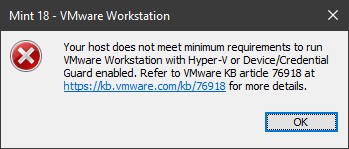
Die VMware Workstation 17.6.3 build-24583834 zickt unter Windows 10 2019 Enterprise LTSC und wirft mir seit dem letzten Update die obige Fehlermeldung entgegen. Die Ursache ist in diesem KB-Artikel beschrieben – die wollen Windows 10 21H2 als Betriebssystem.


 MVP: 2013 – 2016







Der 7.1.-Zweig ist auch auf v7.1.16 aktualisiert wurden und wird noch unterstützt!
Unter WINDOWS nutze ich den 7.2-Zweig und unter LINUX den gereifteren 7.1-Zweig als Testwiese.
Mit dem Extension Pack hatte ich meinen Spaß, es wollte sich partout nicht aktualisieren lassen, auch ließ sich das alte nicht einfach löschen.
Da half nur googeln, deinstallieren und Handarbeit in Registry und Dateisystem.
Eine Treiberdatei ließ sich selbst mit Adminrechten nicht löschen, aber mit dem 7zip-Trick: Datei in Archiv packen mit der Option "Original löschen", dann das Archiv löschen.
Danach konnte ich VB neu installieren inkl. neuem Extension Pack.
Die Aktualisierung der Linux-Gäste klappte diesmal problemlos.
Aber die Schildkröte bei den Gästen ist immer noch da (Windows 10 Pro als Host), daher bleibe ich lieber bei Hyper-V (Windows-Gäste) und VMWare (Linux-Gäste), verteilt auf 2 Hosts.
Wenn du gleichzeitig Hyper-V installiert bzw. aktiviert hast, wirst du immer die Schildkröte haben….
Das Problem ist bei Windows 11, dass du faktisch immer Hyper-V Komponenten aktiv hast. Diese ganzen neueren Sicherheitsfunktionen (Virtual-Based Security aka VBS, Device Guard, Credential Guard), die per Default aktiviert sind und teilweise auch durchs UEFI enforced werden basieren auf den Hyper-V Komponenten. Das kann man zwar alles abschalten, aber es kann passieren, dass nach dem nächsten Update das alles wieder an ist.
Microsoft hat dafür das optionale Windows Feature "Windows Hypervisor Platform" erstellt, dass soll anderen Virtualisierern Zugriff auf die Hyper-V Dienste ermöglichen, die müssen das Feature aber unterstützen. VMware Workstation z.Bsp. kann das, VirtualBox anscheinend nicht.
Das Extension Pack erweitert VirtuaslBox um folgende Funktionen:
– VirtualBox Remote Desktop Protocol (VRDP) server.
– Webcam Passthrough
– Intel PXE boot ROM
– Disk image encryption with AES algorithm
– Cloud integration features
siehe Seite 21:
download. virtualbox. org/virtualbox/UserManual.pdf
Normalerweise braucht man nichts davon.
Die kostenlose Lizenz erlaubt nur einen einzigen Gast auf einem einzigen Host.
siehe:
virtualbox. org/wiki/Licensing_FAQ
Daher sollte man das Extension Pack nicht installieren.
Danke für die Links!
Meinst Du den Passus ""Personal Use" is noncommercial use solely by the person downloading the Product from Oracle on a single Host Computer, provided that no more than one client or remote computer is connected to that Host Computer and that client or remote computer is used solely to remotely view the Guest Computer(s)." aus "https://www.virtualbox.org/wiki/VirtualBox_PUEL"?
Da geht es um verbundene Clients, nicht Guests, was auch Sinn ergibt, denn schon das Clonen einer VM würde sonst ja eine Lizenzverletzung darstellen.
So, wie ich das gelesen habe, gibt es "freely" gar nicht für "commercial use".