[German]Unmanaged systems running Windows 11 24H2 Home and Pro are now being gradually updated to Windows 11 25H2. Microsoft announced this on March 27, 2026. The reason for this move is that support for Windows 11 24H2 Home and Pro will end in October 2026.
I must have missed something that Microsoft announced on March 27, 2026, on its Windows Release Health Status page for Windows 11 24H2. Support with security updates for the Windows 11 Home and Pro editions (version 24H2) will end on October 13, 2026.
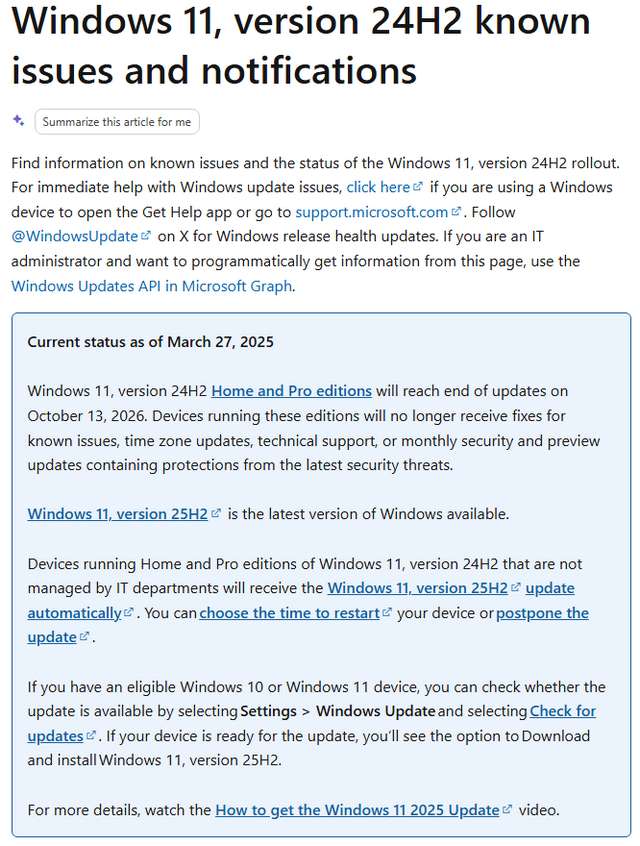
Devices running these editions will no longer receive fixes for known issues, time zone updates, technical support, or monthly security and preview updates. Only Windows 11 24H2 Enterprise and Education will remain supported for another year, but these are used exclusively in corporate environments.
For this reason, all systems running Windows 11, version 24H2, in the "Home" and "Pro" editions that are not managed by IT departments will be updated to the currently available Windows 11, version 25H2. These systems will receive the update to Windows 11, version 25H2, automatically.
Specifically, the KB5054156 enablement update is being delivered to systems via Windows Update (see also Windows 11 25H2: ISO installation image and enablement update available. This update simply unlocks the features of Windows 11 25H2, as these were previously distributed via Windows Update for Windows 11 24H2 as well. Microsoft states that users can choose when to restart their device or postpone the update. After a restart, Windows 11 25H2 should be available following the installation of the KB5054156 enablement update.
If you own a Windows 10 or Windows 11 device eligible for the upgrade, you can check whether the update is available. To do this, open the Settings page and select the Windows Update category. Then click the Check for updates button. If the system is ready for the update, the option "Download and install Windows 11, Version 25H2" will appear. If this option is missing, there is likely a compatibility issue with Windows 11 that is preventing the upgrade.