
 [English]Redmond has probably deactivated its "Microsoft Information Protection API" in the tenants. As a result, Microsoft Outlook no longer works, but throws the error [4usqa]. Here is a brief overview of the situation.
Microsoft Outlook causes problems
German blog reader Bastian R. informed me by e-mail on May 12, 2025 (thanks for that) about an issue that has been affecting his customers since last week. He wrote that he had various customers for whom "Microsoft Outlook has not started in rows since last week". If I have understood correctly, the problem has been occurring more frequently since May 8, 2025.
Microsoft Outlook error [4usqa]
Those affected receive an error dialog with the content "Error Something went wrong. [4usqa]" is displayed.
![Outlook Error [4usqa]](https://i.postimg.cc/cH0KvWDv/image.png)
The error dialog states that the affected person should contact the administrator. The information displayed in the dialog box can be copied via the clipboard and sent to the administrator. I only have a bad photo of the German error dialog, so the English equivalent is included above.
"Microsoft Information Protection API" deactivated
Blog reader Bastian R. wrote that Microsoft must have tinkered with something and deactivated "Microsoft Information Protection API" in the tenants. He referred me to the four-day-old reddit.com thread PSA: error CAA2000B when signing into Outlook, where someone issues a warning.
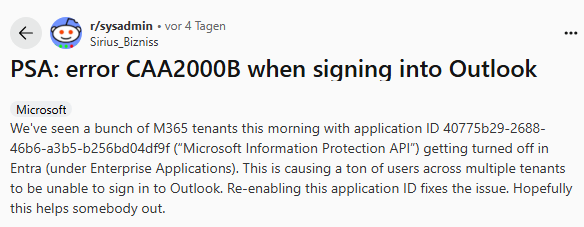
There the thread starter says that he has some Microsoft 365 tenants where the Outlook login fails with the error CAA2000B (although it is a different error code, it seems to be the same cause). On reddit.com there is the second thread Office 365 Login Error TAG: 4usqa Code: 3399614475 FIX with the matching error code. There is a reference to a YouTube video with a "fix".
The cause is probably that the "Microsoft Information Protection API" has been deactivated by Microsoft in the tenants. The administrator must reactivate this deactivated API.
Activate "Microsoft Information Protection API"
According to this description or this article, administrators can navigate to the Enterprise Applications in the Entra Admin Center for the tenant. In the left sidebar with the options, the "Hidden apps" filter should be selectable under All applications.
There, the filter conditions must be set so that the ID 40775b29-2688-46b6-a3b5-b256bd04df9f can be searched for. If the entry "Microsoft Information Protection API" is found, the option "Users can log in" must be set to Yes in the properties.
Is Skype shutdown to blame?
There are various assumptions in the linked threads as to why the "Microsoft Information Protection API" was deactivated by Microsoft in the tenants. One assumption is that there is a license change in connection with Microsoft Office 2021, see this Microsoft support article.
In the German comments one blog reader suspects the Skype deactivation as the cause. A second reader confirms here that he was able to solve the problem by deleting the account, then uninstalling the Skype app, restarting it and setting up the account again.
Similar articles:
Microsoft 365 Issues (Outlook Login) on April 24, 2025?
Outlook 365: Microsoft confirms CPU spikes while typing
Outlook 365: CPU spikes will be fixed "soon"
Word/Excel 2016 crashing after April 2025 update KB5002700
Outlook 2016: Calendar access blocked after April 2025 update KB5002700
Outlook: Calendar remains empty
Office 2016 update KB5002623 fixes crashes in Excel, Outlook, Word (April 10, 2025)
Microsoft kills Skype in May 2025; Teams to be the successor
Skype service expires on May 5, 2025, what you should know




thanks a lot, after waiting 4h to be called back by the Ms support, we found thi sarticle and managed to restor things, gracias
i also thank you a lot. after many hours of searching, i was able to find the problem.
i have found a 1:1 instruction on this site. this worked for me. if you like to share it?
https://answers.microsoft.com/en-us/msoffice/forum/all/access-denied-for-the-resource/7e99668d-dba9-46ee-8939-7997668b4e47
I can confirm with zero tech experience that I was able to get my small teams accounts back online following the link above. After hours on the phone with Microsoft and GoDaddy going back and forth to nowhere, Reddit and this thread pulled thru. Thank you to the original contributors. It is greatly appreciated