
 [German]Quick question for blog readers who are upgrading their machines to Windows 11 25H2: Are you getting a warning that there are NVMe SSD issues? I have received information that NVMe SSDs from WD and Sandisk are causing problems when upgrading to Windows 11 25H2 and that users are being warned.
A reader's note on NVMe SSDs
It was a brief private message on Facebook along the lines of "Hi Günter, I think you reported on this last year. It seems that the problem with 25H2 is back" (thanks for that). The reader also sent me the following screenshot.
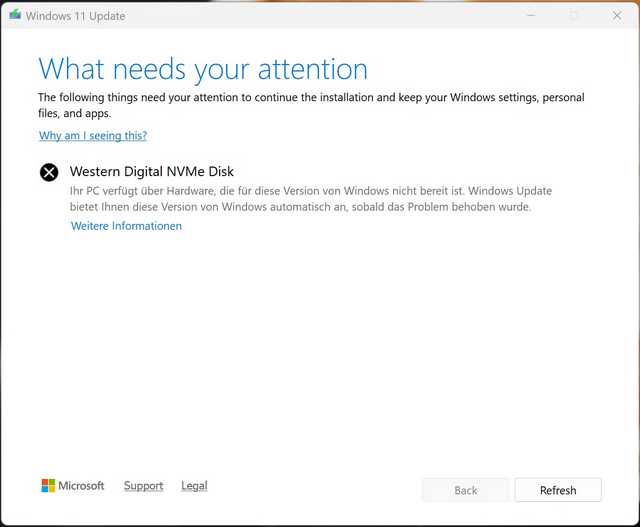
When upgrading to Windows 11 25H2, a dialog box with a warning may appear. It states that an NVMe disk—in this case from the manufacturer Western Digital—is installed in the system. This NVMe SSD is not compatible with Windows 11 25H2, so the upgrade for the machine in question is postponed.
According to the reader, it was an attempt to upgrade from Windows 11 24H2 to 25H2. Therefore, they were very surprised why the above warning only appeared now. I am currently unsure whether this is a new problem exclusive to Windows 11 25H2 or whether it is the firmware in NVMe SSD controllers that is causing the issue. If the latter is true, a firmware update should fix the problem, as I have outlined below for Windows 11 24H2. The reader wrote to me: The workaround was again the firmware update (after disabling Bitlocker).
Old problem with Windows 11 24H2
I searched here in the blog—this exact problem had already occurred with Windows 11 24H2. In the post Windows 11 24H2: SSD firmware updates fixes crashes, I reported in October 2024 that there were potential problems with Windows 11 and specific SSDs.
Western Digital's NVMe SSDs caused crashes (blue screens) under Windows 11 24H2. Windows Latest, for example, pointed out this problem here. The problem affects NVMe SSD models that do not have their own DRAM as buffer memory. Model examples are SN580 and SN770, as Bolko mentioned in this German comment.
According to the manufacturer, the models WD_BLACK SN770 NVMe SSD 2TB, WD_BLACK SN770M NVMe SSD 2TB, WD Blue SN580 NVMe SSD 2TB, WD Blue SN5000 NVMe SSD 2TB, and Sandisk Extreme M.2 NVMe SSD 2TB are affected. In the Western Digital forum, this thread reveals a workaround in the form of a registry entry.
Microsoft had therefore suspended distribution of the update to Windows 11 24H2 if the affected NVMe SSDs were installed in the devices. Then Western Digital and SanDisk released firmware updates for their NVMe SSDs, as Bolko noted in this German comment. This firmware is intended to fix the blue screens caused by the host memory buffer issue in Windows 11 24H2.
In the support article Internal SSD Critical Firmware Update Available for Solving BSOD on Windows 11 24H2 Update, SanDisk explains that the firmware update fixes an issue with the HMB (Host Memory Buffer) for certain models of Western Digital and SanDisk SSDs, where the NVMe SSD drive can cause a BSOD on Windows 11 24H2.
Similar articles
Windows 11 25H2 released (Sept. 30, 2025)
Windows 11 25H2: ISO installation image and enablement update available
Windows 11 25H2: Is the NVMe problem back?
Windows 11 24H2: Camera bug fixed; new problem with DRM media playback




I have an old Corsair MP500 that began experiencing Critical Process Died BSoDs the update after *.4771 and of course no firmware updates for me. All my SSDs are PCI-E 3.0 and thus not expected to get any manufacturer support by now. I'm completely SoL for security updates now without going back to 23H2 or Win10 LTSC. Gotta love this "trust" obsession these days… Losing trust in the entire tech industry, personally.