[German]The Group Policy Editors (gpedit.msc or gpmc from the RSAT tools) are "broken" in Windows 11; due to a bug, it does not perform the tasks assigned to it by the administrator. Entered values are not applied but are truncated due to an overflow error and then saved. Mark Heitbrink reported this to Microsoft in March 2026 but has not received a response yet.
A Reader's Note from Mark Heitbrink
Mark contacted me on May 5, 2026, via email with the subject line "Why the PAW is (or should be) a server" and pointed out to me that both gpedit.msc and gpmc from the RSAT Tools exhibit a serious error on a Windows client OS.
The bug really only occurs on Windows 11 clients; on a Windows Server, the test value is set correctly, as Mark discovered during his tests. I haven't been able to reproduce it on Windows 10 IoT 2019 Enterprise LTSC or 22H2 (I hope I didn't make a mistake in a rush and that I didn't miss the big picture because I was too focused on the details).
Mark notes that he reported the bug to MS Research at the end of March 2026 ("Submission number: VULN-180447, Case number: 111952"). But aside from an automated response saying "We've received it, thank you," there has been no further feedback so far.
Reproducing the error
Mark has since described the whole issue on gruppenrichtlinien.de in the post "Kaputt: GPEdit und GPMC am Client – Stand 05.2026". To reproduce the problem, launch either gpedit.msc on the client or GPMC from the RSAT Tools in Windows 10 or Windows 11. Then navigate to the following branch in the Group Policy Editor:
Computer Configuration\ Administrative Templates\ Windows Components\ Delivery Optimization\
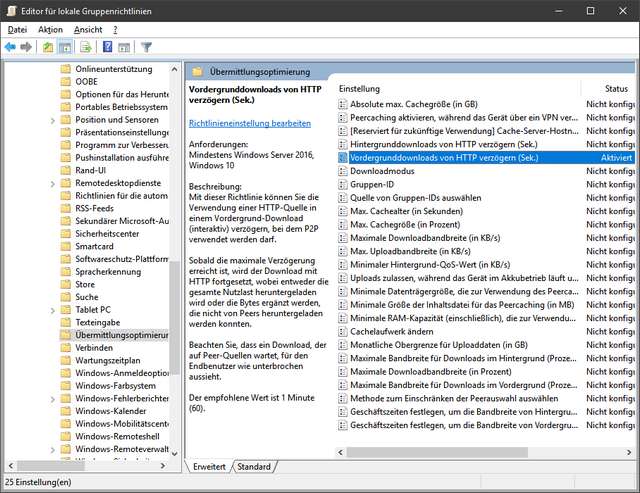
The above screenshot shows the German edition. Then select the group policy Delay Foreground download from http (in seconds).
Next, open the Group Policy Editor and enter the decimal value "4294967295" (FFFF FFFF) in the corresponding field of the enabled group policy.
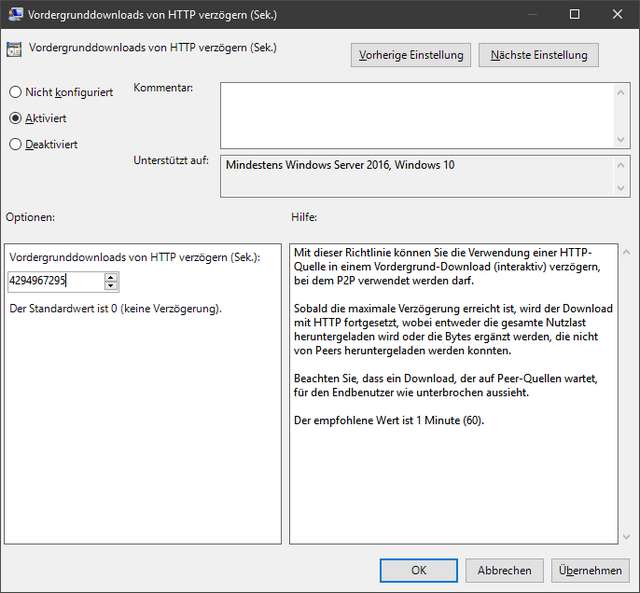
For me, the Policy Editor dialog box closes without any message, and the policy is enabled. When I then check this policy in Windows 10 IoT 2019 Enterprise LTSC, the decimal value "4294967295" appears in the display (see the dialog box above). However, on Windows 11 25H2, I got once the result shown in the screenshot below.
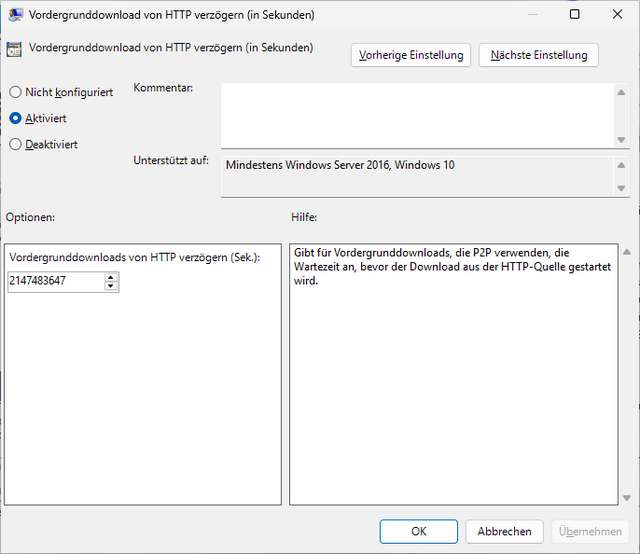
The policy editor has reduced the value to "2147483647" in decimal (7FFF FFF). Later I tried to reproduce this, but wasn't able. I then published the German edition of this blog post, and got the confirmation from other German readers, that they observed the behavior, that the value was reduced to "2147483647".
A possible reason
Mark suggested a possible cause in his German post here. Dennis Lange and Stefan Kanthak suspect that the Windows client uses the INT data type instead of unsigned INT. This causes an overflow when calculating the value 2**31 – 1 = 2147483647. When reading the *.ADMX file, the Policy Editor converts the value to LONG (alias INT) instead of DWORD (alias "unsigned INT") and modifies it.
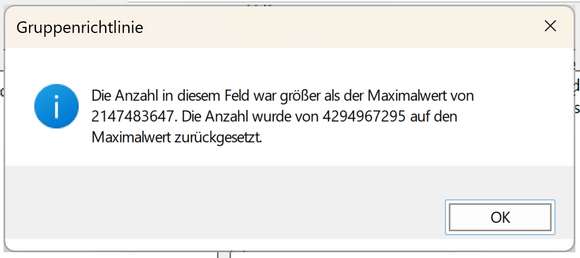
However, contrary to Mark's description, I don't see a dialog box with a corresponding message shown above, saying the the value in the file is above the max value. And it's even more complex – I've tested it with Windows 10 2019 IoT Enterprise LTSC and Windows 10 22H2, the value will be written properly. In Windows 11 25H2 (running in a VM), the value is altered during writing into the registry. Another user Bolko commented here, that his Windows 11 Version 25H2 – Build 26200.6584" (09. September 2025) also didn't alter the written registry values. He has blocked Windows 11 updates, so it might a patch that has introduced a bug.
Mark writes, "There are over 50 policies with the MaxValue issue, spread across OS, Defender, and Office policies," and provides further details in his article. Can any of you reproduce this?