
 [German]On August 27, 202, Microsoft released preview update KB5120998 for Windows 11 24H2–25H2. Although many fixes and improvements were announced, there are now increasing reports that this preview update causes the mouse cursor to malfunction in Windows and removes the desktop background wallpaper. Affected users are left with only an outdated version of the mouse cursor. You should refrain from installing the preview update for now. But there appears to be a workaround.
Windows 11 24H2/25H2: Preview Update KB5120998
The Preview Update KB5120998 for Windows 11 24H2–25H2 listed on this Microsoft website includes fixes that are being rolled out gradually and fixes that are generally available. In the blog post "Windows 11 24H2 – 25H2: Preview Update KB5120998 (27. August 2026)" I provided an overview of these fixes, new features, and changes [use build in translation to read the text in English].
There are issues with the mouse pointer and wallpaper
It appears that this preview update, KB5120998, in Windows 11 24H2–25H2 is causing some changes to the mouse pointer's appearance. And there are reports, that the desktop wallpaper has been exchanged by a block background. Numerous users worldwide are reporting related issues.
First Reader Reports on the Blog
A German blog reader who commented under the name "Herr Zeiger" writes that the update has messed up his mouse pointer. He now has "one of those wonky old-school cursors with a pixelated staircase pattern." The reader notes that there are additional reports on x.com and reddit.com. Furthermore, the wallpaper is also being removed.
In subsequent comments, blog readers Carsten and Andreas confirm these bugs with the mouse pointer and the desktop background (wallpaper). Andreas writes that the mouse pointer can no longer be changed and remains in the "old-school" design.
Complaints on X About the Mouse Cursor and Wallpaper
For example, I came across the following tweet on X, which complains that after installing the Preview Update KB5120998 in Windows 11 24H2–25H2, the mouse cursor is "broken."
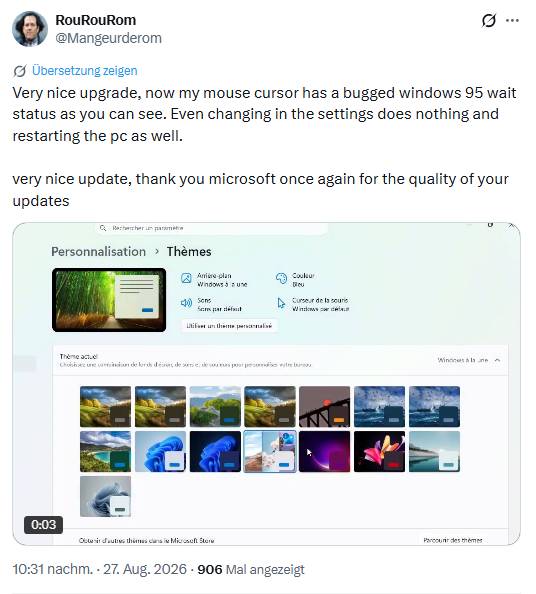
The mouse pointer is stuck in "the faulty Windows 95 idle state." Even changing the settings doesn't help, nor does restarting the PC.
Threads at reddit.com
On the reddit.com platform, there is a thread titled The cursor style is not changed, where an affected user complains that after the update (KB5120998) (26200.9278), they can no longer change the cursor style. The mouse pointer retains the old Windows 95 appearance. Restarting the computer, etc., does not help.
Another reddit.com thread "Windows 11 KB5120998 out with Movable Taskbar, customizable Start menu (large/small, no recommendation), and Windows Search without Bing/MS Store!" discusses the new features of the preview update. One comment also points out issues with the mouse pointer.
After install 26200.9278 aka KB5120998 custom hidpi cursor gone. Instead I got big white cursor whos change for a second during loading animation or something like that to standard white Aero animation and smaller. I rollback to previously used compilation 26200.9267 and cursor look back to normal.
After the update, high-DPI cursor displays are no longer available. Uninstalling the update resolves the issue.
A collection of bug reports regarding the KB5120998 preview update can be found in the reddit.com thread August 27, 2026—KB5120998 (OS Builds 26200.9278 and 26100.9278) Preview. There, too, users immediately complained that the update had changed the desktop background from the wallpaper to a solid (black) color. And the first poster wrote that he was pretty sure his mouse pointer was now slightly larger in its normal state. He was able to change the desktop background, but not the mouse pointer.
More reports and a workaround
There are other reports at German sites, and there is a thread on the Windows 11 forum dedicated to the preview update, where this commenter complains that a background image has disappeared—all that was left was a black background. He also feels that his mouse pointer suddenly looks much larger than before. Windows Latest recommends in this article, not to install the preview update due to the bugs.
A German blog reader proposed a workaround for the botched cursor size, that I described within my German blog post [use the build in translator to read the text].