
 [German]The Microsoft security updates released for Office applications on September 8, 2026, are causing serious collateral damage. In Excel, it is no longer possible to select and copy anything.
Note: Use the German blog's build in translation feature to read the German blog posts linked below in English.
Office Updates from September 8, 2026
On September 8, 2026, Microsoft released a batch of security updates for the MSI versions of MS Office 2016, even though this version has long since reached end of support. In addition, the Click-2-Run versions of Microsoft Office 2016–2024 and the Microsoft 365 apps were updated. As for Office 2024, I'm currently unsure whether an update has been released. An overview of the updates can be found in the German blog post "Patchday: Microsoft Office Updates (8. September 2026)". It's primarily the numerous remote code execution (RCE) vulnerabilities that have been patched in the Office applications that have caught my attention.
Excel issues after September 2026 Updates installed
The security fixes in the September 2026 update seem to be causing serious problems. I've come across several reports about this.
Reader Comments within my German blog
German blog reader Michael posted this German comment around noon on September 9, 2026, reporting issues. The reader wrote (I've translated his comment):
In Office 2016, we can no longer copy a row and paste it into another row. Yesterday's Office updates have been installed.
I assume that "Office" here simply refers to Microsoft Excel 2016, where cells cannot be copied.
German blog reader Hackmanck confirms in this German comment that he is having problems copying cells in Excel. In addition, AutoFill no longer works. He is experiencing this issue with the MSI version of Microsoft Office 2016 (32-bit). In that version, updates can still be uninstalled; that is, uninstalling Update KB5002914 restores Microsoft Excel to full functionality. However, this is a security update for Excel 2016 that addresses various information disclosure and RCE vulnerabilities listed in the support article.
A Reader Report via Email
German blog reader Rainer F. contacted me via email on September 9, 2026, and confirmed serious Excel issues with the September 2026 updates for Microsoft Office.
I noticed that with yesterday's/today's update, both in Excel 2024 LTSC Pro and 2021 LTSC Pro, copy and paste within Excel isn't working; after a rollback, everything works again. Unfortunately, I haven't seen any further information yet.
I replied to Rainer that the problem had been confirmed by other readers on the blog.
Post on Microsoft Q&A
A blog reader referred to Microsoft Q&A in the comments on the forum post Excel 2016 Update Windows on 9 Sep 2026. The user reported that a problem with Excel 2016 occurred after the "Windows Update" on September 9, 2026. Copying and pasting no longer worked.
Another user stated that this behavior was caused by KB5002914. Other posters confirmed these issues with Office LTSC Standard 2021, noting that the affected user was unable to downgrade the Click-2-Run version. One user noted an error 0xc0000005 (access violation) in Excel.
Reports on auf reddit.com
On reddit.com, there is a short post titled Excel copy paste not working, which also reports that copy and paste in Excel is broken after the September 2026 update. Another reddit.com post also complains that Autofill and copy-and-paste in Excel are broken. In addition, there is the reddit.com post "Office LTSC 2021 Build 16.0.14334.20906 — Excel VBA macro stopped working, rollback to 20848 fixed it," which reports macro issues.
Question on the patchmanagement.org mailing list
On the patchmanagement.org mailing list, in the thread titled "anyone seeing copy/paste issues in Excel Office 2019", Susan Bradley also asks whether anyone has noticed the limitations mentioned in the thread title following the September 2026 update. She is experiencing an issue where Excel lost its copy and paste functionality in Microsoft Office 2019 due to the update.
Microsoft 365 apps also affected
In the reports above, I've only come across Microsoft Office versions between 2016 (MSI) and 2024 (C2R) that are affected. I had linked to the German blog post at the German admin forum administrator.de. There is a report there that an error in the clipboard is being reported in the M365 Apps for Business version 2608 (Build 20326.20144):
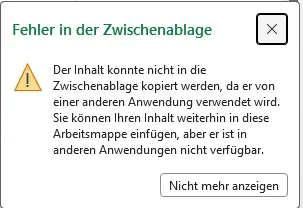
It stated there that the copied row can, however, be pasted without any problems within Excel, even into a different workbook. Furthermore, the bug apparently only affects the Current Channel again; in the monthly Enterprise Channel (Semi-Annual), which the relevant administrator primarily distributes within the company, version 2608 (Build 20326.20142) is running. There have been no reports of this issue with that version (yet).
Notes on Rollback
To rollback Microsoft Office, you can use several ways. German blog reader Heiko describes within this German comment a GPO setting to pin the Office build to a specific version and, if necessary, force a rollback.
Sebastian has left this German comment mentions using an XML configuration file to perform a rollback by reinstalling. Microsoft has published this support article on rolling back to a previous version of Office.
Alternatively, it should be possible to perform a rollback via the command prompt after closing all Office applications.
"C:\Program Files\Common Files\Microsoft Shared\Microsoft\ClickToRun\OfficeC2RClient.exe" /update user updatetoversion=16.0.XXXXX.XXXXX
Specify the version with the desired string in the command. Within the German blog post, there are more reader comments related to rollback issues.
Similar articles (German]:
Microsoft Security Update Summary (8. September 2026)
Patchday: Windows 10/11 Updates (8. September 2026)
Patchday: Windows Server-Updates (8. September 2026)
Patchday: Microsoft Office Updates (8. September 2026)
Exchange Server: Sicherheitsupdates (8. September 2026)
WSUS-Sync-Problem durch September 2026-Updates gefixt
September 2026-Updates fixen Mauszeiger- & Desktop-Wallpaper-Bugs und App-Crashes




We were able to solve this by using this PowerShell script shown below. First, close all Office programs and pause Windows Updates. The latest versions in use at our place were Microsoft Excel 2016 (16.0.5569.1003) and MSO (16.0.5569.1003) 64-bit; afterward, it's 16.0.5569.1001, with the same MSO version.
Save this script as uninstall_KB5002914.ps1 and run it with administrator privileges. A reboot was not required.
$KB = 'KB5002914'
function ConvertFrom-PackedMsiGuid {
param([Parameter(Mandatory)][string]$Packed)
if ($Packed.Length -ne 32) {
throw "Invalid MSI-GUID: $Packed"
}
function Rev([string]$s) {
-join [char[]]$s[$s.Length..0]
}
function Swap([string]$s) {
$r = "
for ($i = 0; $i -lt $s.Length; $i += 2) {
$r += $s[$i + 1]
$r += $s[$i]
}
$r
}
$a = -join $Packed.Substring(0,8).ToCharArray()[7..0]
$b = -join $Packed.Substring(8,4).ToCharArray()[3..0]
$c = -join $Packed.Substring(12,4).ToCharArray()[3..0]
$d = Swap $Packed.Substring(16,4)
$e = Swap $Packed.Substring(20,12)
"{$a-$b-$c-$d-$e}"
}
$root = 'HKLM:\SOFTWARE\Microsoft\Windows\CurrentVersion\Installer\UserData\S-1-5-18\Products'
$matches = foreach ($product in Get-ChildItem $root -ErrorAction Stop) {
foreach ($patch in Get-ChildItem "$($product.PSPath)\Patches" -ErrorAction SilentlyContinue) {
$info = Get-ItemProperty $patch.PSPath
if ($info.DisplayName -like "*$KB*") {
[pscustomobject]@{
ProductGuid = ConvertFrom-PackedMsiGuid $product.PSChildName
PatchGuid = ConvertFrom-PackedMsiGuid $patch.PSChildName
DisplayName = $info.DisplayName
Uninstallable = $info.Uninstallable
}
}
}
}
if (-not $matches) {
Write-Host "$KB was not found as an installed MSI patch."
return
}
$matches | Format-List
foreach ($m in $matches) {
if ($m.Uninstallable -ne 1) {
Write-Warning "$($m.DisplayName) According to Windows Installer, it cannot be uninstalled."
continue
}
$log = "$env:TEMP\$KB-uninstall.log"
$p = Start-Process `
-FilePath "$env:WINDIR\System32\msiexec.exe" `
-ArgumentList @(
'/package', $m.ProductGuid,
'/uninstall', $m.PatchGuid,
'/passive',
'/norestart',
'/L*v', $log
) `
-Wait `
-PassThru
Write-Host "ExitCode: $($p.ExitCode)"
Write-Host "Log: $log"
if ($p.ExitCode -eq 0) {
Write-Host "$KB successfully uninstalled."
}
elseif ($p.ExitCode -eq 3010) {
Write-Host "$KB successfully uninstalled. Windows restart required."
}
else {
Write-Warning "Uninstallation Failed. MSI ExitCode $($p.ExitCode)"
}
}
Siehe hier:
https://www.reddit.com/r/excel/comments/1wbs5x4/comment/p9pdekm/
hat bei mir das Problem behoben
Won't fix for all affected users.
**Subject: Excel LTSC 2024 16.0.17932.20996 – Copy/Paste fails when copying FROM a worksheet containing Conditional Formatting**
I found a reproducible Copy/Paste regression in Excel LTSC 2024 build 16.0.17932.20996.
The important detail is that the problem is **specific to copying FROM a worksheet that contains Conditional Formatting**. It does not affect the whole workbook.
### Minimal reproduction
1. Create a new blank workbook.
2. Create two worksheets:
* Sheet1: no Conditional Formatting.
* Sheet2: add a simple Conditional Formatting rule to one cell.
3. Enter `hello` in a cell on Sheet1.
4. Copy Sheet1 → Sheet2: **works correctly**.
5. Enter `hello` in a cell on Sheet2.
6. Copy Sheet2 → Sheet1: **Copy/Paste silently fails**.
7. The same failure occurs when copying a newly created cell containing only plain text; it is not related to formulas or the cell contents.
I also reproduced the problem in an existing, long-standing `.xlsm` workbook. A worksheet containing Conditional Formatting could not be copied from normally, even when the source cell contained only simple text.
Interestingly:
* Copying **Values** from the affected worksheet works.
* Copying **Formulas** works.
* Copying **Formats** fails.
* Normal Copy/Paste fails.
* Copying from a worksheet without Conditional Formatting into the affected worksheet works.
### Workaround / confirmation
I rolled back Office LTSC 2024 from:
**16.0.17932.20996 → 16.0.17932.20910**
using Click-to-Run.
"C:\Program Files\Common Files\Microsoft Shared\ClickToRun\OfficeC2RClient.exe" /update user updatetoversion=16.0.17932.20910
After the rollback, both:
* the minimal test workbook, including Copy/Paste after adding Conditional Formatting, and
* the original affected workbook
work correctly again.
Environment:
* Windows 11 Pro 25H2
* Microsoft Office LTSC Standard 2024
* Version 2408
* Affected build: 16.0.17932.20996
* Working build: 16.0.17932.20910
**Subject: Excel LTSC 2024 16.0.17932.20996 – Copy/Paste fails when copying FROM a worksheet containing Conditional Formatting**
I found a reproducible Copy/Paste regression in Excel LTSC 2024 build 16.0.17932.20996.
The important detail is that the problem is **specific to copying FROM a worksheet that contains Conditional Formatting**. It does not affect the whole workbook.
### Minimal reproduction
1. Create a new blank workbook.
2. Create two worksheets:
* Sheet1: no Conditional Formatting.
* Sheet2: add a simple Conditional Formatting rule to one cell.
3. Enter `hello` in a cell on Sheet1.
4. Copy Sheet1 → Sheet2: **works correctly**.
5. Enter `hello` in a cell on Sheet2.
6. Copy Sheet2 → Sheet1: **Copy/Paste silently fails**.
7. The same failure occurs when copying a newly created cell containing only plain text; it is not related to formulas or the cell contents.
I also reproduced the problem in an existing, long-standing `.xlsm` workbook. A worksheet containing Conditional Formatting could not be copied from normally, even when the source cell contained only simple text.
Interestingly:
* Copying **Values** from the affected worksheet works.
* Copying **Formulas** works.
* Copying **Formats** fails.
* Normal Copy/Paste fails.
* Copying from a worksheet without Conditional Formatting into the affected worksheet works.
### Workaround / confirmation
I rolled back Office LTSC 2024 from:
**16.0.17932.20996 → 16.0.17932.20910**
using Click-to-Run.
"C:\Program Files\Common Files\Microsoft Shared\ClickToRun\OfficeC2RClient.exe" /update user updatetoversion=16.0.17932.20910
After the rollback, both:
* the minimal test workbook, including Copy/Paste after adding Conditional Formatting, and
* the original affected workbook
work correctly again.
Environment:
* Windows 11 Pro 25H2
* Microsoft Office LTSC Standard 2024
* Version 2408
* Affected build: 16.0.17932.20996
* Working build: 16.0.17932.20910