
 [German]The preview update KB5120998, released by Microsoft on August 27, 202 for Windows 11 24H2–25H2, is causing several issues. After installing the update, users have reported issues with the mouse pointer and the loss of the desktop background, among other issues. Microsoft has now acknowledged that the issues do not appear to affect non-English versions of Windows 11. Based on the information available to me, I wonder if we are now seeing the consequences of vibe coding and the use of AI at Microsoft.
The articles linked below to my German blog may be read by the blog's build-in translation feature (see the translate feature in the upper right corner of the web site).
My Review of the Issues with KB5120998
In the German blog post Windows 11 24H2 – 25H2: Preview Update KB5120998 (27. August 2026), I provided an overview of the fixes, new features, and changes in the August 27, 2025, preview update for Windows 11 24H2 and 25H2. However, this optional preview update caused various issues that were reported to me by blog readers.
- The mouse cursor may take on the "Windows 95" style—and users report that they cannot change the mouse cursor through the settings. I reported on this issue in the blog post Windows 11 24H2/25H2: Preview Update KB5120998 Causes Mouse Cursor Issues (August 27, 2026). Microsoft later acknowledged the problem (see my blog post Windows 11 24H2/25H2 Preview Update KB5120998: Microsoft bestätigt Mauszeiger-Probleme).
- The preview update resets desktop backgrounds (wallpaper and themes) and replaces them with a black background. In this comment, a German blog reader points out that the colors of custom and Windows-provided high-contrast themes (for people with low vision) have changed completely after the update (text is now sometimes white on a white background). The changes persist until the next restart. I had also mentioned these issues in the post about mouse pointer problems. Microsoft later confirmed the problem (see Windows 11 24H2/25H2 Preview Update KB5120998: Microsoft bestätigt Desktop-Hintergrund-Probleme).
A reader on BlueSky informed me that the Windows 11 "AlwaysOn VPN" feature also stopped working after the update. There's also the issue where Windows 11 reports that Defender is disabled (see Microsoft Defender meldet fälschlich abgeschalteten Windows-Virenschutz (28.8.2026)), though this is not related to the update mentioned above. These are clearly "a lot of problems," even though Microsoft had actually promised a quality initiative for Windows 11 for the second half of 2026.
Microsoft's attempts to explain the issues
Microsoft has published several support articles with explanations in the "Known Issues" section of the Windows 11 24H2 and 25H2 Release Health Dashboard.
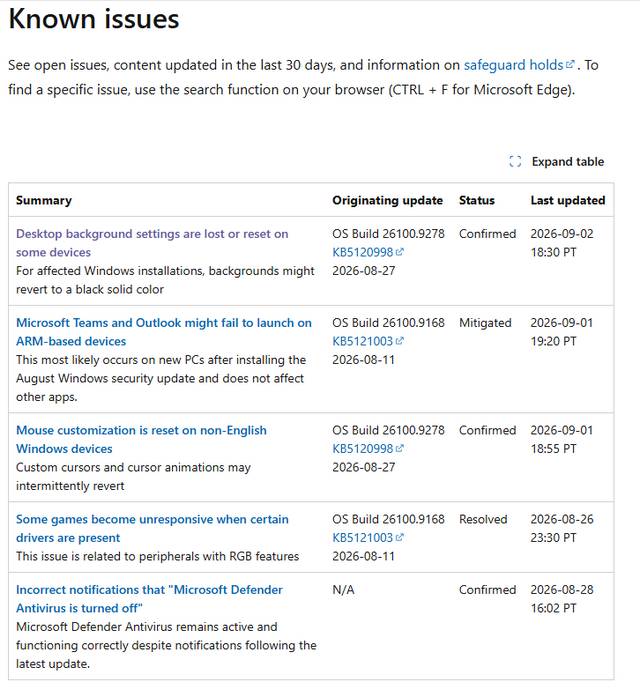
In the article Desktop background settings are lost or reset on some devices, readers learn why, for example, a "black desktop background" occurs. Microsoft explains that some Windows desktop settings simply do not load. On affected devices, attempting to manually restore customized settings does not work. This is because the issue prevents the settings from loading correctly, regardless of their value. In this case, a default black background is used instead.
Then there's the support article Mouse customization is reset on non-English Windows devices, where the reader learns only that the broken mouse pointers occur exclusively on non-English Windows 11 devices. It's also not possible reassigning the mouse cursor, since the custom mouse settings will later be reset to certain default settings. These include the mouse cursor and cursor animations selected in "Mouse Properties" in Windows, Microsoft writes.
Redmond simply states that investigations have shown this issue is caused by code components used in non-English Windows installations. In the affected language versions, these settings cannot be loaded, so the default settings are used instead. Attempts to manually restore the setting values fail because the issue prevents these settings from loading, regardless of their value.
A Look Behind the Scenes
As usual, Microsoft remains vague regarding the exact nature of the bugs. But it does leave a bad taste in one's mouth to learn that certain pieces of code aren't loading and that Windows 11 then executes a fallback procedure and uses some default setting just to function at all. The statement that the mouse pointer bug only affects non-English versions of Windows 11 also suggests that either testing has been neglected in Redmond, or that this aspect has been left to telemetry and AI. That has gone awry.
But there's another aspect to this story, because I interpret the "glitches" mentioned above simply as the result of vibe coding (AI-generated code that the user doesn't understand) as well as AI slop, where developers have code generated and tested for them, no longer understand the code or the tests.
I have my reasons for this assumption. In this German comment by blog reader mihi on August 28, 2026, regarding the post Windows 11 24H2/25H2: Preview Update KB5120998 zerschießt Mauszeiger (27. August 2026), a piece of the puzzle fell into place that Microsoft didn't want to reveal in the support articles linked above. Blog reader mihi wrote that the problems were likely due to a "translation issue." Here is the reader's original comment (I just translated it from German to English]:
Registry keys have been translated. The wallpaper, which has long been stored at:
HKEY_CURRENT_USER\Control Panel\Desktop\WallPaper
will be stored [in a German Windows 11] at the following location after the update:
HKEY_CURRENT_USER\Control Panel\Desktop\HintergrundbildAlthough the default mouse pointer and its settings are still stored under:
HKEY_CURRENT_USER\Control Panel\Cursors\Arrowbut they are read from this registry key:
HKEY_CURRENT_USER\Control Panel\Cursors\Pfeil
The reader wrote: "If you manually rename or copy the relevant registry keys (Arrow -> Pfeil, Wait -> Warten, Crosshair -> Fadenkreuz, No -> Nein, Help -> Hilfe) and when you log back in, the mouse pointers return to normal. But don't even think about trying to customize them through the Settings app or Control Panel." The reader notes that all of this applies to the German version of Windows 11 and suspects that the English version of Windows 11 works differently.
This very assumption has now been confirmed by Microsoft, which states that the mouse cursor issues only affect non-English versions of Windows 11. And that brings me to my assumption, that "vibe coding" and "AI slop" is the culprit: Developers are letting their code generated by Claude Code, Copilot, etc., without reviewing it again. And the LLMs spew out all sorts of nonsense, as the example above with the translated registry paths shows. To be honest, I don't have much hope that things will get better with Windows 11 or Microsoft's development efforts.




I had the problem with Greek Windows with English as the 2nd language. None. All registry keys were in English but the cursor problem was there.