 [German]Microsoft provides the Edge WebView2 runtime for Windows, which is used by applications. A reader informed me that, since installing Build 152.0.4191.53, the mouse pointer is no longer displayed in the Veeam B&R console or in the "Care Center" used there. However, there is a workaround.
Edge WebView2 Runtime (Build 152.0.4191.53)
The Microsoft Edge WebView2 Runtime is a Microsoft system component for Windows that enables desktop applications to display and execute web content (such as HTML, CSS, and JavaScript). It serves as a rendering engine (based on Microsoft Edge's Chromium technology) that allows programs to display web pages or web-based user interfaces directly within their own app interface.
The Microsoft Edge WebView2 Runtime can be downloaded from this Microsoft page. The Microsoft Edge WebView2 Runtime Version 152 Update for x64-based editions (Build 152.0.4191.53) has been available for download from the Microsoft Update Catalog since August 27, 2026
A Reader reported mouse pointer issues
Blog reader Bernhard L. works as an IT administrator at Diakonie in Austria and contacted me via email on September 1, 2026, to report a problem. Since installing the "Microsoft Edge-WebView2 Runtime Version 152 Update for x64 basierte Editionen (Build 152.0.4191.53)" the mouse pointer has stopped working in some applications at his company (e.g., Care-Center = care documentation for care of older people, Veeam Backup & Replication console, version 13.x).
The mouse pointer simply isn't rendered and shown. Clicking still works, but interacting with GUI elements becomes a matter of chance, since you don't know whether, for example, a button will be selected without a mouse pointer.
The reader notes that the Microsoft Edge WebView2 Runtime Version 151 Update for x64-based editions (Build 151.0.4129.107) was also installed on a Windows Server. The corresponding GPO, which is intended to ensure that veeam.backup.shell.exe and carecenter.exe are launched using the Edge WebView 2 Runtime version 151.0.4129.107, is indeed present on the servers but is consistently ignored. No matter what has been tried so far, the Microsoft Edge WebView 2 Runtime version 152.0.4191.53 is always launched.
Bernhard wrote: "It would be great if you could post about this issue on your blog. I'm sure there are other admins out there facing the same problem."
There is a workaround
In a follow-up email, Bernhard got back to us a few hours later and wrote: "In case you're interested, we've now implemented the following workaround, which allowed us to restore the mouse pointer in Care Center and VBR." The CAB file for Microsoft Edge WebView2 Runtime version 151 was extracted to this folder.
c:\temp\webview151
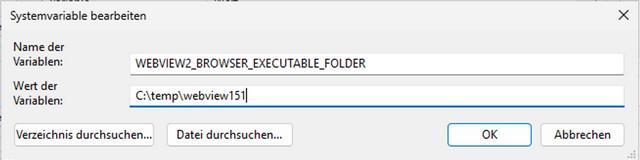
Then, as shown in the following figure, the value of the relevant system variable, WEBVIEW2_BROWSER_EXECUTABLE_FOLDER, was set to the path of the folder.
After that, the mouse pointer from the older Edge WebView2 Runtime 151 was visible again during rendering. Maybe this will help someone. Addendum: Note the comment from Daniel Weber below:
Right-click the Veeam Backup & Replication Console shortcut and open:
Properties → Compatibility → Change high DPI settingsEnable:
Override high DPI scaling behaviorThen set:
Scaling performed by: System (Enhanced)Click OK and restart the Veeam console.
After that, the mouse pointer was visible again for that reader – maybe it's more smooth compared with the solution outlined above.




Hi,
It works!
Thx for this info . Was quite helpful .
Great finding! This works!
Hmm, this didn't work for me.
I've downloaded x64 version of 151.0.4129.107 from https://developer.microsoft.com/en-us/microsoft-edge/webview2?form=MA13LH&cs=437408884#download, extracted it to c:\temp\webview151 but Veeam Console errors to "Failed to connect to the backup server: cannot find the required Microsoft Edge View component installed."
Maybe it's because 13.1.1.18 relies on 152.0.4191.62?
okay, it worked using :
expand C:\Temp\Microsoft.WebView2.FixedVersionRuntime.151.0.4129.107.x64.cab -F:* C:\Temp\webview151
Thanks a lot!
My solution was:
Right-click the Veeam Backup & Replication Console shortcut and open:
Properties → Compatibility → Change high DPI settings
Enable:
Override high DPI scaling behavior
Then set:
Scaling performed by: System (Enhanced)
Click OK and restart the Veeam console.
After that, the mouse pointer was visible again.
Disable "Hide pointer while typing" under Control Panel → Mouse → Pointer Options, then restart the Veeam console.
This resolved the issue for me.
The Workaround that helped us was to disable the following Option under settings:
Mouse -> Pointer Options -> Hide Pointer while typing
Update:
I've moved to the workaround too.
Cause KB5124008 addresses the issue on W11 but not on our 2016 german language systems.