 [German]A German blog reader contacted me about a strange behavior, he faced on hypervisors. Microsoft Defender flags Synology backups on the affected user's servers as a Trojan. As a result, the backups no longer run. The reader wrote to me that selecting "Allow" for this process disables the entire detection rule. And even more striking is the reader's analysis of what triggers Microsoft Defender's response.
A Reader's Note on a Defender False Positive
German blog reader Stefan M. contacted me on August 3, 2026, via email. Under the subject line "Defender flags Synology backups as a Trojan—and clicking 'Allow' disables the entire detection rule" he reported a huge trap for administrators (thanks for that). The reader uses Microsoft Defender on his Windows servers and relies on Synology backups to store his data (mostly on hypervisors).
Stefan informed me that Microsoft Defender on his servers has consistently prevented the backups from running. This wasn't due to an error in the backup itself, but because Defender mistook the Synology backup program as a Trojan and quarantined it. Since then, the reader's virtual machines have been "unprotected", because no backup exists.
Background: Multiple Affected Systems
Synology Active Backup for Business (ABB) is affected. To provide some initial context, the reader described the following error scenario to me:
- The problem occurred almost simultaneously on all Windows hypervisors that I manage for various customers—different locations, different networks, different Windows Server versions.
- At the same time, a colleague experienced the same issue in an environment completely independent of mine. Active Backup for Business is up to date on all systems, as the reader confirmed.
- On all affected systems, Defender is running in its default configuration: no hardening, no increased cloud blocking level, and no additional rules.
According to the reader, local configuration, a specific server version, a specific ABB status, and chance can therefore be ruled out. "For once, it wasn't my fault—such a rare moment in our line of work that I'm putting it on record here," the reader noted in his mail.
The Defender's false alert
Stefan wrote that the Defender claims to have detected a threat: "Trojan:Win32/ Commando.A!ml." The severity level is "Important/Severe," and the status is "Removed." In other words, the Synology backup program was placed in quarantine. Stefan has sent me the screenshot below
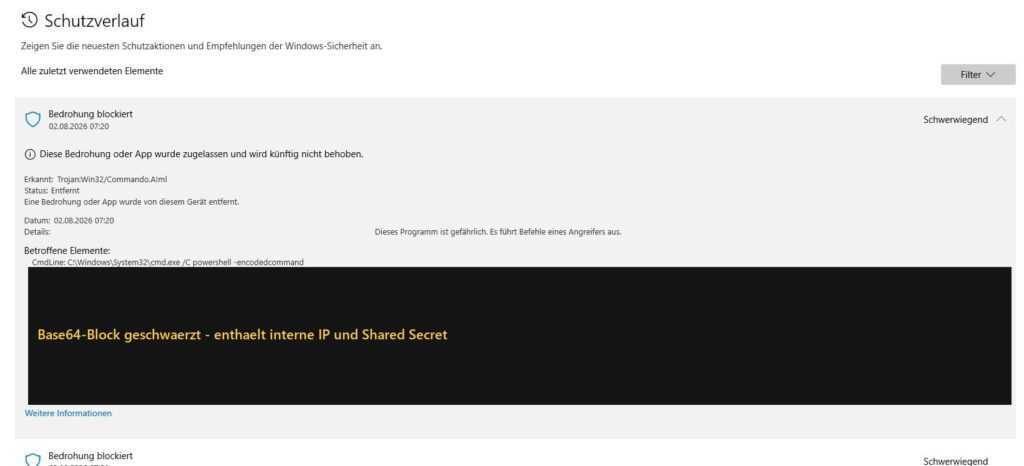
Defender report; click to zoom
Here is the Defender's assessment, which the reader quoted verbatim because it becomes even more peculiar in the context that follows:
"This program is dangerous. It executes commands from an attacker."
The protection log identifies the affected element as a command line—not a file, but this specific command:
C:\Windows\System32\cmd.exe /C powershell -encodedcommand <langer Base64-Block>
According to the reader, 15 such entries appeared in the log on one of the affected servers within two days—at hourly intervals. This is because the connection test runs as a scheduled task. The "attacker" that Defender reportedly detected is, above all, one thing: punctual, the reader wrote.
Analysis: What the "Attacker" Actually Does
The blog reader then conducted an analysis and wrote: "The really interesting part, however, comes only after you rule out the false positive in the most obvious way."
A connection test as the cause
The reader took a closer look at the Base64 block reported by Defender and wrote: "If you decode the Base64 block (UTF-16LE), the attack turns out to be a connection test":
$ip = '<NAS-IP>'
$port = 5510
$secret = '<Token>'
$b64 = "QhAABmFjdGlvbhAAD3Rlc3RfY29ubmVjdGlvbkA="
$data = [System.Convert]::FromBase64String($b64)
$client = New-Object System.Net.Sockets.TcpClient
$client.Connect($ip, $port)
$stream = $client.GetStream()
$stream.Write($data, 0, $data.Length)
...
if ([System.Text.Encoding]::ASCII.GetString($response) -eq $secret) {
@{Connected = $true}
}
The inner Base64 string is 29 bytes long, which in plain text means { action: "test_connection" }. This is the complete "malicious" code:
- Establish a TCP connection to the NAS on port 5510, send 29 bytes,
- check the response against a shared secret,
- return {"Connected": true}.
No code reloading, no Invoke expression, no persistence, no file or registry access, the reader wrote. The target is a private address on the same network ("so the attacker is sitting in the server rack next door," the reader noted in their email).
And then there's this line in the analysis that caught my eye, where things get really cryptic:
raise "fail"
This is because "raise" is a statement in Python. It doesn't exist in PowerShell syntax; there, it's called "throw." So PowerShell diligently searches for a command named "raise," finds none, and throws a CommandNotFoundException. This lands in the surrounding catch block and ultimately returns {"Connected": false}. The error path thus does exactly what it's supposed to—though not because an error is thrown there, but because the line is simply broken.
This brings the reader back to Defender and its assessment that this program is executing commands from an attacker. "An attacker who breaks off their backchannel in the wrong programming language would be a first for me. For machine-generated vendor-provided code, on the other hand, it's a familiar sight."
This is probably not even about Synology
The reader then wrote in his analysis: "The same detection name—internal ThreatID 2147840094—had already struck my workstation on July 27, 2026, targeting a completely unrelated, self-written PowerShell script. Different computer, different code, no Synology in sight. The only thing both cases had in common was the -EncodedCommand parameter." According to the reader, on one affected server, three different programs even triggered the same signature: cmd.exe, powershell.exe, and pwsh.exe.
The signature therefore does not detect a specific program, but rather a behavioral pattern: encoded command, network connection, Base64 payload. According to the reader's analysis, Synology stands out only because a production backup service is running on it.
Similar false positives have also been documented in other tools that automatically generate their PowerShell commands, such as in issues 15423 and 26218 of the OpenAI Codex project.
The real issue: Clicking "Allow" leads to disaster
After the fifteenth alert in the logs, the user did what administrators do at this time of night: he clicked "Allow" in the Microsoft Defender protection history. The alerts stopped, and the administrator was satisfied at first.
The mistake was then to check what that click actually does. The result ended up worrying the reader far more than the false alarm. Clicking "Allow" causes Defender to write a single registry value. Event 5007 records it:
HKLM\SOFTWARE\Microsoft\Windows Defender\Threats\ThreatIDDefaultAction\2147840094 = 0x6
The value 2147840094 is the signature number; 0x6 means "Allow." It is not the tool's path, not its hash, not the command line—rather, the detection rule itself is disabled. This applies device-wide, for any program that exhibits this pattern in the future. The reader notes that it's not "my script" that's allowed, but rather the user is allowing "encoded PowerShell with a network connection." The reader explains that the "!ml" in the name stands for Machine Learning. Stefan notes that such signatures are intentionally broad. Unfortunately, this broadness is then included when granting permission.
From the blog reader's perspective, three characteristics make this entire approach extremely problematic. He described them as follows:
- It's the technique that allows it, not the tool – The signature exists because attackers use this pattern. Anyone who disables it to get their own backup running again also disables it for anyone else who uses the same pattern.
- It's practically invisible – The entry isn't listed under "Exclusions," where every administrator looks. It also doesn't appear in Get-MpPreference—as verified: ThreatIDDefaultAction_Ids remains empty. It's buried three clicks deep under Protection History, Allowed Threats—a view you only open if you already know it exists. A successor in the role will never find it and will eventually wonder why this Defender remains so remarkably relaxed when it comes to encoded PowerShell.
- It's permanent! – No deadline, no follow-up, no expiration date. A single click at 9:39 a.m. continues to take effect for years, even through operating system upgrades.
The Microsoft Defender interface actively encourages this line of reasoning, the reader notes. This is because the Defender dialog displays a specific command line with a specific timestamp. So the administrator feels as though they're deciding on a one-time exception. And the button is labeled "Allow," not "Permanently disable this detection rule"—which is unfortunate, since the latter would be the more accurate label.
What Works
"To get ABB working again, you need to follow two steps, and the second one is often overlooked," the reader told me: First, you need to resolve the issue. And second, you have to restart the "Synology Active Backup for Business Service" on the Windows host.
Without the second step, nothing happens at all. The service has logged the failed connection test as "NAS not reachable" and sticks to that status. This is difficult to scale; both steps must be performed locally on the respective host—which, as the reader notes, takes a whole morning when dealing with multiple customer environments.
Stefan added in his email: "For the first step, I now consider a strict path or process exclusion to be a better approach than allowing the signature. It remains visible and can be found during the next audit. It would be cleaner, however, if Synology didn't fire off the connection test as a Base64-encoded command line. A script stored as a signed file on the disk wouldn't trigger the signature in the first place—and, incidentally, would look less like a ransom demand."
It's Almost Impossible to Report the Problem
Incidentally, according to the reader, reporting the false positive is a cumbersome process: There is no file to submit to Microsoft. And a file containing exactly the command line listed or flagged above is not flagged during a scan. The reader has tested this.
Microsoft provides the option "Submit a fileless detection for analysis" using the MpSupportFiles.cab diagnostic package for such cases, Stefan wrote. This is indeed documented, but in a location that you can only find if you already know it exists. The reader suspects that most affected users simply click away from the finding and never report it to Microsoft.
Some Additional Information
The blog reader sent me the decoded script as a text file, along with an analysis of the payload. Here is the relevant source code for the script:
# =======================================================================
# Synology Active Backup for Business - interner Verbindungstest
# Dekodierter Klartext des von Windows Defender als
#
#     Trojan:Win32/Commando.A!ml
#
# gemeldeten Befehls. Fund vom 02.08.2026, 07:20 Uhr, auf einem
# Windows-Server mit Hyper-V. Defender im Auslieferungszustand
# (keine Haertung, keine erhoehte Cloud-Blockstufe).
#
# Original-Aufruf laut Defender-Schutzverlauf:
#     C:\Windows\System32\cmd.exe /C powershell -encodedcommand
#
# Dekodiert mit:  base64 -d | iconv -f UTF-16LE
# Der Code wurde zur Analyse NICHT ausgefuehrt, nur dekodiert.
#
# ANONYMISIERT: Es handelt sich um eine Kundenumgebung. Die NAS-Adresse
# und das Shared Secret wurden durch  bzw.  ersetzt.
# Alles Uebrige ist unveraendert.
# ======================================================================

$ErrorActionPreference = "Stop"
Try {
$(try{
$ip = ''
$port = 5510
$secret = ''
$b64 = "QhAABmFjdGlvbhAAD3Rlc3RfY29ubmVjdGlvbkA="
$data = [System.Convert]::FromBase64String($b64)
$client = New-Object System.Net.Sockets.TcpClient
$client.ReceiveTimeout = 30000
$client.Connect($ip, $port)
if (-not $client.Connected) {
raise "fail"
}
$stream = $client.GetStream()
$stream.Write($data, 0, $data.Length)
$buffer = New-Object byte[] 128
$bytesRead = $stream.Read($buffer, 0, $buffer.Length)
$response = $buffer[0..($bytesRead-1)]
if ([System.Text.Encoding]::ASCII.GetString($response) -eq $secret) {
@{Connected = $true}
} else {
raise "fail"
}
} Catch {
@{Connected = $false}
})| ConvertTo-Json -Depth 10
} Catch {
$host.ui.WriteErrorLine(($_ | Select CategoryInfo,FullyQualifiedErrorId,@{N="Exception";E={,@($_.Exception | Select Message)}} |ConvertTo-Json))
exit 1
}

# ============================================================================
# ANALYSE
# ============================================================================
#
# 1) DER INNERE BASE64-PAYLOAD
#
#    QhAABmFjdGlvbhAAD3Rlc3RfY29ubmVjdGlvbkA=
#
#    HEX  : 42 10 00 06 61 63 74 69 6f 6e 10 00 0f 74 65 73 74 5f 63 6f 6e
#           6e 65 63 74 69 6f 6e 40
#    ASCII: B...action...test_connection@
#    Laenge: 29 Byte
#
#    Struktur (schlichtes TLV-Format, Type-Length-Value):
#      0x42 'B'      = Start-Marker
#      0x10 0x0006   = Typ String, Laenge 6   -> "action"
#      0x10 0x000F   = Typ String, Laenge 15  -> "test_connection"
#      0x40 '@'      = End-Marker
#
#    Im Klartext also:   { action: "test_connection" }
#
#
# 2) WAS DAS SKRIPT TUT
#
#    - baut eine TCP-Verbindung zur NAS auf Port 5510 auf
#      (Kommunikationsport zwischen ABB-Agent und ABB-Server)
#    - sendet die 29 Byte oben
#    - vergleicht die Antwort mit einem Shared Secret
#    - gibt {"Connected": true} bzw. false als JSON zurueck
#
#    NICHT enthalten: Nachladen von Code, Invoke-Expression, Persistenz,
#    Datei- oder Registry-Zugriffe, Verschluesselung, Exfiltration.
#    Ziel ist eine private RFC1918-Adresse im selben LAN.
#
#
# 3) WARUM DER DEFENDER TROTZDEM ANSCHLAEGT
#
#    Vier Merkmale eines C2-Beacons treffen zusammen:
#      a) cmd.exe /C powershell -encodedcommand  (Base64-verschleierter Befehl)
#      b) roher Socket ueber System.Net.Sockets.TcpClient statt HTTP
#      c) fest hinterlegtes Shared Secret zur Pruefung der Antwort
#      d) weiterer Base64-Blob, zur Laufzeit dekodiert und verschickt
#
#    Das Suffix !ml kennzeichnet einen Machine-Learning-Treffer,
#    keinen Signaturtreffer.
#
#
# 4) NEBENBEFUND
#
#    'raise "fail"' ist kein gueltiges PowerShell, sondern Python-Syntax.
#    In PowerShell laeuft es ins Leere und wird vom umgebenden Catch
#    eingefangen - der Fehlerpfad funktioniert eher zufaellig.
#    Deutet auf maschinell erzeugten Klebe-Code hin.
#
#
# 5) LOESUNG
#
#    a) Defender -> Schutzverlauf -> Fund aufklappen -> "Zulassen"
#    b) Auf dem Windows-Host den Dienst neu starten:
#         Restart-Service "Synology Active Backup for Business Service"
#
#    Ohne Schritt b) bleibt es beim fehlgeschlagenen Backup: Der Dienst hat
#    den abgeschossenen Verbindungstest als "NAS nicht erreichbar" verbucht
#    und verharrt in diesem Zustand.
# ============================================================================
These are customer environments, so the NAS address and shared secret have been replaced in the code above. Everything else is as it was in the original. Thanks to the reader—and a question for fellow readers: Is anyone else experiencing this issue?
Within my German blog post I got since yesterday several administrator's feedback, that they are also hit by this false alarm. German blog reader Stefan M. has contacted me in a second mail, because he had answers from Synology (they confirmed the issue, and will provide hopefully a solution in future), and from Microsoft (the won't change anything). It's covered in part II (see the links below – currently only in German).
Article series
I: Microsoft Defender flags Synology backups as a Trojan (Aug. 3 2026)
II: Nachtrag zum Defender-Fehlalarm: Rückmeldung von Synology und Microsoft
III: Synology erklärt, warum die zweite Backup-Warnung nie kommt: